Simulate CBGTC and get data for analysis
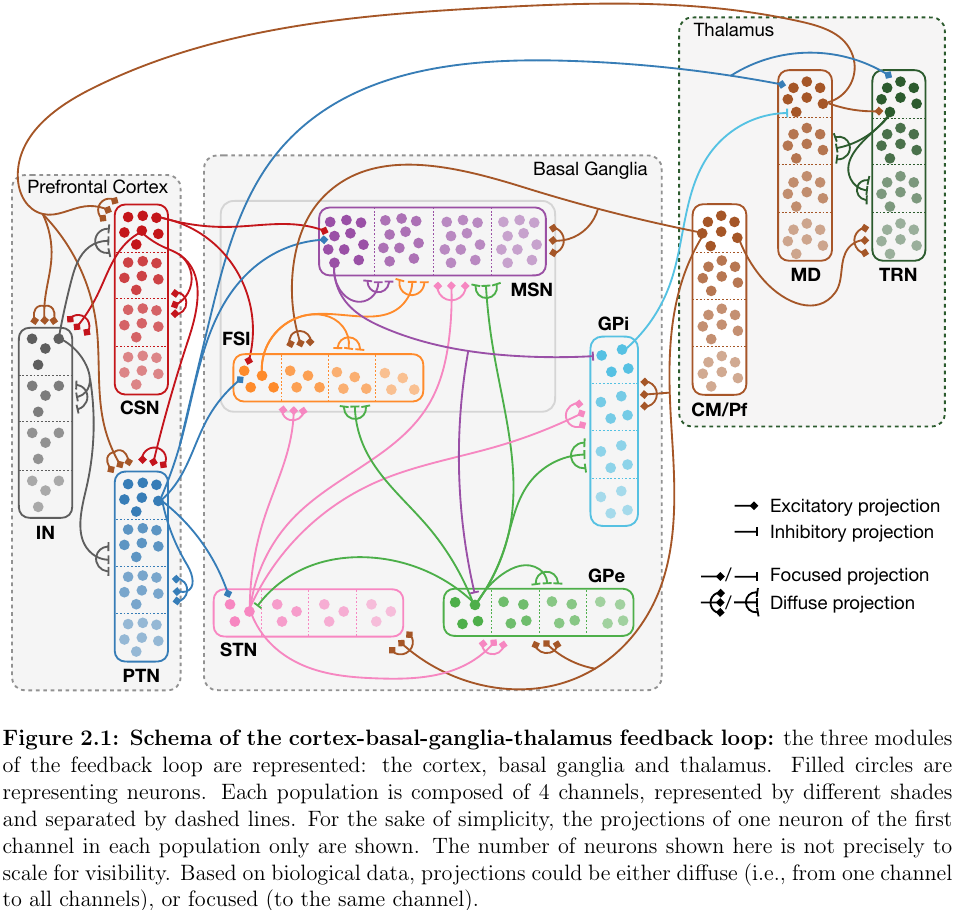
The CBGTC Model is available here with the accompanying Jeanne Barthelemy’s thesis.
Regardless of how one sets up the simulation, to use this analyseaur tool
Example simulation pipeline
1. Get (Go to) the model
Get the model that has been prepared of graded disinhibition (testinhib branch)
git clone ssh://git@gitlab.isir.lan:2222/cobathaco-catatonia/CBGTC.git
cd CBGTC
2. Create a shell script for batch run
#!/bin/sh

cut_BG=False # keep the connection
build_new_connection_map=True

decay_list=(0 0.10 0.15 0.20 0.25 0.30 0.35 0.40 0.45 0.50)

sCSN_number=1
ffCSN_number=1
ffPTN_number=0.1
sMD_PTN_number=0.1
sIN_PTN_number=0.9
sCSN_PTN_number=7.0
sPTN_number=0.1

mkdir -p /home/share/data1_recorded
sim_id=0
for decay in "${decay_list[@]}"; do
    if [ $sim_id -ne 0 ]; then
        build_new_connection_map=False
    fi

    decayBG_number=$(printf "%s" "$decay")
    echo -e "sCSN=${sCSN_number}\nffCSN=${ffCSN_number}\ndecayBG=${decayBG_number}" > decay_params.py
    echo -e "\ncut_BG=${cut_BG}\nsMD_PTN=${sMD_PTN_number}\nsIN_PTN=${sIN_PTN_number}" >> decay_params.py
    echo -e "\nffPTN=${ffPTN_number}\nsCSN_PTN=${sCSN_PTN_number}\nsPTN=${sPTN_number}" >> decay_params.py
    echo "Running simulation id $sim_id for ffCSN $ff with decayBG $decay"
    python mymainCBGTC.py -i $sim_id -b $build_new_connection_map
    wait
    echo "Done running simulation id $sim_id for (sPTN, ffPTN) = ( ${sPTN_number} , ${ffPTN_number} )with decayBG $decay"
    echo "\nand (sMD_PTN, sCSN_PTN, sIN_PTN) = ( ${sMD_PTN_number} , ${sCSN_PTN_number} , ${sIN_PTN_number} )"
    cp -r DataAnalysis/records/recordedData/model_9/ /home/share/data1_recorded/model_9_sim$sim_id
    cp -r DataAnalysis/records/recordedData/model_9_cortex/ /home/share/data1_recorded/model_9_cortex_sim$sim_id
    cp -r DataAnalysis/records/recordedData/model_9_thalamus/ /home/share/data1_recorded/model_9_thalamus_sim$sim_id
    ((sim_id++))
done

mv Studies/current_study/ /home/share/data1/
mv DataAnalysis/records/*.csv /home/share/data1/
cp -r BASAL_GANGLIA/connection_lists/ /home/share/data1/BG/
cp -r CORTEX/connection_lists/ /home/share/data1/CORTEX/
cp -r THALAMUS/connection_lists/ /home/share/data1/THALAMUS/
Structure of stored results
Wherever you have directed the simulation results (in the shell script above) to be saved in, for N simulations the results sub-folder structure will look like
.
├── BG/
│   ├── connection_list/
│   │   ├── scale=4_nbchannels=4/
│   │   │   └── model_9/
│   │   └── active_cortex_inputs_scale=4_nbchannels=4/
│   │       └── model_9/
│   ├── 1/
│   ├── 2/
│   ├── ...
│   └── N/
├── CORTEX/
│   ├── connection_list/
│   │   ├── Thalamus_inputs_nbpops=4/
│   │   └── nbpops=4/
│   ├── 1/
│   ├── 2/
│   ├── ...
│   └── N/
├── THALAMUS/
│   ├── connection_list/
│   │   ├── nbpops=4/
│   │   ├── BG_inputs_nbpops=4/
│   │   └── active_cortex_inputs_nbpops=4/
│   ├── 1/
│   ├── 2/
│   ├── ...
│   └── N/
├── data_recorded/
│   ├── model_9_sim1/
│   ├── model_9_sim2/
│   ├── ...
│   ├── model_9_simN/
│   ├── model_9_cortex_sim1/
│   ├── model_9_cortex_sim2/
│   ├── ...
│   ├── model_9_cortex_simN/
│   ├── model_9_thalamus_sim1/
│   ├── model_9_thalamus_sim2/
│   ├── ...
│   └── model_9_thalamus_simN/
├── BV_results.csv
├── CortexResult.csv
└── rates_per_channel_4_channels.csv
where
terminal folders in connection_list/ contains files connection_lists_i.dat and connection_lists_j.dat
respective terminal folder 1/, 2/, …, N/ contains many csv files that stores respective raw data.
These are absolutely raw data. For example, spike times a each sampling during the course of the simulation.
terminal folders in data_recorded/ also contains many csv files that stores respective raw data.
Although these are also raw data the csv’s contains data returned by Brian 2 computation. For example this has firing rate computed as each sampling during the course of the simulation.
Additional Remarks
When running batch runs it is advisable to run the very first simulation with the option build_new_connection_map=True
creating new connections is compute intensive
but doing this for only the first run will make sure you are running the desired connection configuration
otherwise you risk running simulations for the previously stored connection setup
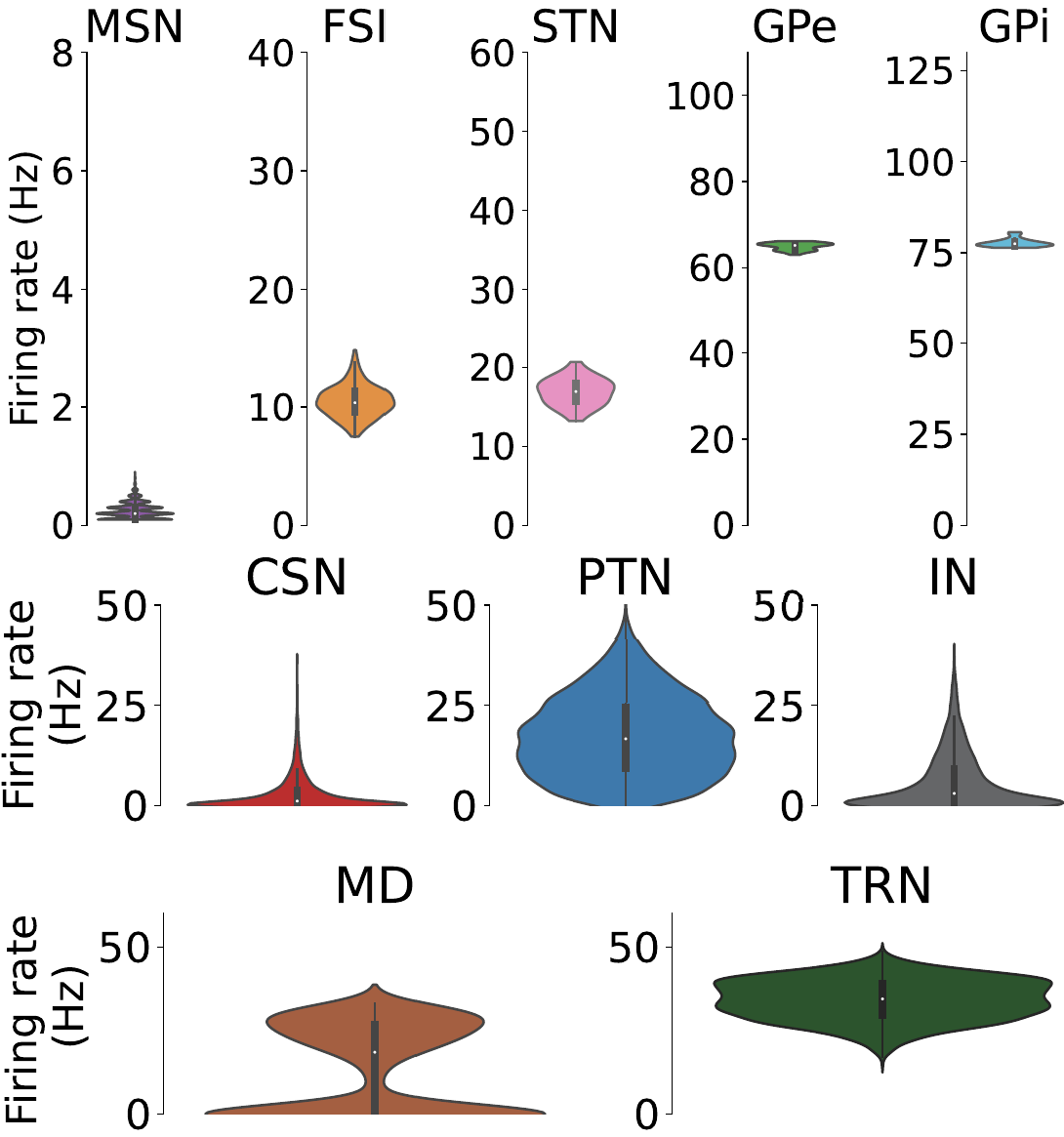
While setting up the model for experiments make sure that at baseline the nuclei has the baseline frequencies as shown below.